Barcode for pharmacy products: strips, bottles and the batch
A barcode for pharmacy products you pack: one number per pack size, placed so the counter scanner reads it, with batch and expiry kept apart.
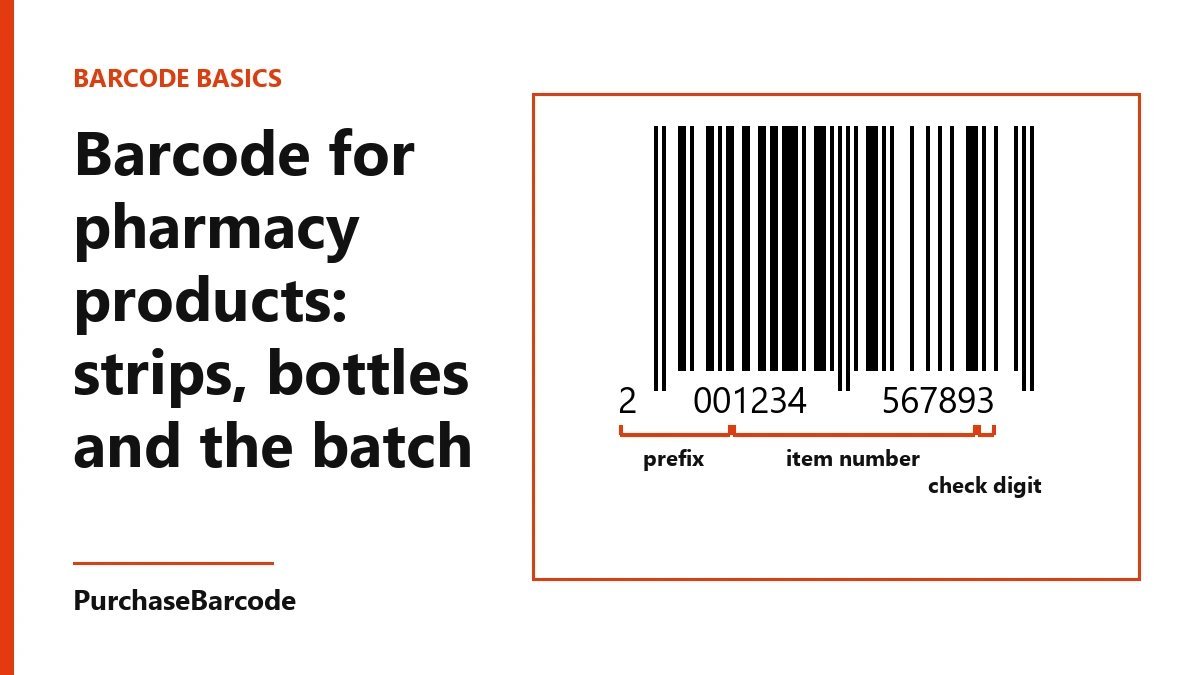
Give each pharmacy product you pack its own retail number for each pack size, so a strip, a bottle and a box of strips are three numbers. Print the batch and expiry as text beside the barcode, because they change and the number does not.
What a barcode for pharmacy products does at your counter
A barcode for pharmacy products does one job. The scanner reads the bars, your billing software finds the item, and the name and MRP land on the bill. The bars hold nothing else. The number points to a line in your own product list, and that list holds the rest.
This post is for the range you pack and sell under your own shop name or brand: cotton rolls, crepe bandages, gauze swabs, hand sanitiser, a tub of petroleum jelly, a bottle of rose water, a strip of throat lozenges made for you. Items that come from a maker already carry the maker's barcode, so you scan those as they arrive. By the end you will have a number for every pack you sell, a label that scans on the first try, and a place for the batch that is not the barcode.
One number for each thing you sell
Start with a sheet of paper or a spreadsheet. Write one row for every item a customer can carry to the counter and pay for on its own.
The rule is simple. If the price, the size or the contents change, it is a new row and a new number. A 100 ml bottle and a 200 ml bottle of the same sanitiser are two numbers. A strip of 10 lozenges and a box of 10 strips are two numbers, because you sell both and they carry different MRPs. Lemon and mint flavours of the same lozenge are two numbers.
A new label design with the same contents and the same MRP keeps its number. So does a new batch.
A small shop range often comes to 12 to 30 rows. Count them, add a few spare for the sizes you plan next season, and that is the size of pack you need. The barcode guide explains which type of barcode fits which product if you are unsure.
Strips: small, flat and often cut
Strips are the hardest item on a pharmacy shelf to scan. They are narrow, the foil shines, and customers often buy half a strip.
Print the barcode on a paper label, not straight on the foil. Shiny foil bounces the scanner's light back and the read fails. A matt white label about 38 mm by 25 mm takes a full-size barcode with room for the product name above it.
Stick the label on the box the strips come in, and on the strip itself only if you sell single strips. Do not try to scan a cut half. A barcode cut through the middle will not read, and a torn label invites the wrong price. If you sell half strips often, make a separate row for a half strip and keep its barcode on a card under the counter.
Keep the bars whole. The scanner needs the full width of the bars plus a clear margin on each side, about the width of three or four bars. A label trimmed close to the bars is the most common reason a strip label fails.
Bottles and tubs: turn the bars
On a flat box the bars stand upright like a fence. On a small round bottle, turn the barcode so the bars lie flat like the rungs of a ladder, running around the bottle.
The reason is the curve. Upright bars wrap round the side of a narrow bottle, and the outer bars bend away from the scanner. Lying flat, every bar sits at the same distance from the scanner window. On a bottle wider than about 60 mm across, either way works.
Put the label on the body of the bottle, not on the cap or the shoulder. Caps get swapped and shoulders curve two ways. Keep the barcode off any seam in the label, and away from the edge where the label overlaps itself.
For tubs, the side wall reads better than the lid. Lids go missing and get put back on the wrong tub.
The batch is not the number
This is where most pharmacy labels go wrong. The batch and the expiry change with every lot you pack. The product number does not.
If you made a new number for each batch, your billing software would fill up with copies of the same product, each with its own stock count. Your shelf would hold 40 bottles and your software would split them across four lines. Reorders would stall.
So keep the two apart. The barcode carries the product. The batch and expiry go on the label as plain text, beside or under the barcode: "Batch B-24, Exp 08/27". Print them in a size a customer can read without glasses, at least 8 point.
To trace a batch, keep a simple register. One row per lot: product, batch, date packed, expiry, quantity. When a customer brings back a bottle, the printed batch tells you which row to look at. The barcode tells you which product it is. Between them you have the whole story.
Printing the labels
A thermal label printer is the usual choice for a counter. Pick one that prints at 300 dpi if your labels are small. A 203 dpi printer is fine for box labels, but the bars on a strip label come out ragged at that resolution.
Print black bars on a white label. Red, orange and light brown bars vanish under most scanners, because the scanner reads with red light. Dark blue and dark green on white are safe. Avoid printing over a pattern or a photo.
Do not shrink the barcode to make room for the logo. Keep it at full size where you can, and never below about 80 percent. If space is short, cut the logo.
Store labels away from the window. Thermal labels fade in sunlight and near heat, and a faded barcode scans badly within a few months. For stock that sits on a sunny shelf, a thermal-transfer printer with a ribbon lasts much longer.
Scan before you stock the shelf
Before a new product goes out, take three labelled packs to the counter. Scan each one with the scanner you use every day, the way a busy counter would. The right name and MRP should come up each time, on the first pass.
Then scan the strip label held flat, the bottle held at an angle, and a box held at arm's length. If any of them fails, fix the label before you print the next roll. It is far cheaper to reprint 20 labels than 2,000.
If you also sell the same range online or to another shop, tell us where you sell through the contact page before you order, and we will tell you which pack suits it.
Use code STARTUP10 for 10% off one order per account. It is valid until 31 December 2026 or for the first 100 uses on this site, whichever comes first.
The numbers for your whole range come in the EAN-13 packs, with barcode files ready to print on your labels.
These are correctly formed, scannable numbers issued to you alone. A standard retail or POS scanner reads them: it checks the number's structure and its check digit, nothing more. Whether a marketplace or retailer accepts one is that channel's own decision — a small share of platforms and retailers look every number up in the global barcode database and will ask for a registered code instead. Tell us where you plan to sell and we will check it with you before you buy. Which barcode do I need?